
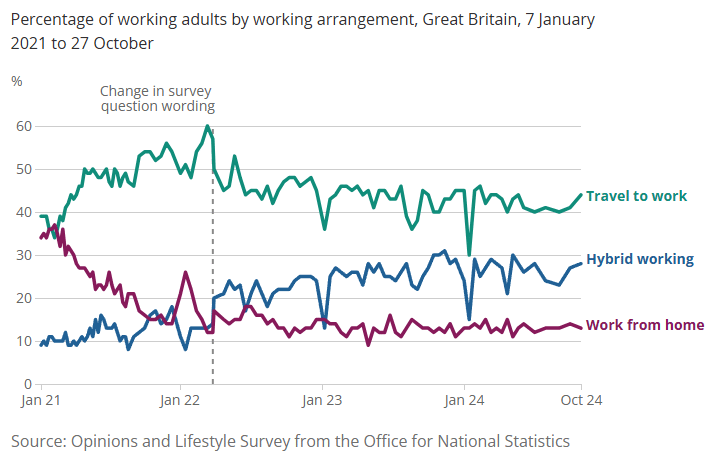
What began as ‘Zoom fatigue’ during the pandemic is now a lasting workplace reality. According to the ONS, the number of professionals adopting the hybrid working model has continued to rise over the last five years. Despite enjoying a better work-life balance, many of us are still suffering from the effects of spending too much time in online meetings.
In the UK, the majority of professionals report that virtual meetings interrupt their working day, and hybrid work patterns mean many of us switch between in-person and virtual meetings dozens of times a week. A survey by recruitment specialist Robert Walters found that:
- 73% of professionals think virtual meetings hamper their productivity
- A quarter of UK professionals have 5+ virtual meetings a day
- 56% state that some virtual meetings are more productive than others
- Only 5% would opt for a virtual meeting to ‘get things done’
- To make important business decisions, 67% would opt for an in-person meeting over a video call
But the good news is that we now know why video conferencing fatigue occurs, and yes, many of our initial hunches have turned out to be correct. Research carried out by Stanford’s Virtual Human Interaction Lab found that the tiredness many people feel after virtual meetings comes from what they call “nonverbal overload.” On screen, we deal with unusually intense eye contact, constant reminders of our own appearance, close-up faces, and the effort of interpreting limited body language. Together, these create far more strain than a face-to-face conversation.

Stanford developed the Zoom Exhaustion and Fatigue (ZEF) scale, a research-based tool to measure the different dimensions of videoconference fatigue, from emotional and physical tiredness to social and motivational drain. Studies using the ZEF scale show a clear link between daily hours spent on video calls and higher fatigue levels, with self-view and constant eye contact among the strongest contributors.
Later studies using the ZEF scale showed that women and newer employees were the main groups reporting the highest impact due to added appearance-related stress.
Don’t Shoot the Messenger: It’s Not the Tech, It’s How We Use It
It’s tempting to pin the blame on software like Zoom or Teams when we feel drained after a day of virtual meetings. But the reality is that the platforms themselves are simply the messenger; they deliver the meeting, they don’t design it. Just as a poorly run face-to-face meeting can leave you frustrated, an online meeting without structure or clear facilitation quickly becomes tiring.
‘Zoom’ fatigue stems less from the software and more from how organisations schedule and run meetings; too many, too long, and with little attention to engagement. In other words, ‘Zoom’ fatigue isn’t inevitable. It’s a management and skills issue, not a technology one.
That’s why learning to plan, facilitate and present effectively in a virtual setting makes such a difference. With the proper techniques, you can design shorter, sharper sessions, create interaction at the right moments, and ease the visual and mental strain that video calls often create. It’s not about turning the camera off and giving up on virtual communication; it’s about using these tools more thoughtfully so they work for you, not against you.
Energy Management Over Time Management

When it comes to virtual meetings, the challenge isn’t just finding time in the diary. It’s about managing the energy you and your audience bring to the screen. Video calls demand far more focus than in-person meetings, so even short sessions can leave people mentally drained if they’re poorly run. Instead of simply blocking time slots, effective presenters should think in terms of energy flow: building in natural breaks, using interaction every few minutes to reset attention, and varying tone and pace to keep people engaged. By managing energy in this way, you prevent the slow drain of “Zoom fatigue” and turn meetings into sessions people can actually look forward to. To tackle the key causes of Zoom fatigue – from cognitive overload to dwindling attention and poor meeting design – we’ve developed our 3-R approach – a simple, easy-to-remember framework to help keep energy levels high.
The 3 Rs of Energy Management in Virtual Meetings
- Reset: Break the monotony every 7–10 minutes with a question, poll, or short activity. This resets attention and prevents passive screen-watching.
- Refresh: Build in natural breaks. Even just 60 seconds to stretch, breathe, or turn away from the screen helps meeting attendees recharge.
- Re-energise: Change pace and tone. Shift from presenting slides to open discussion, or move from gallery view to breakout groups to spark fresh energy.
With these simple steps, you don’t just fill calendar time; you can actively manage the energy in the (virtual) room.
Practical, Evidence-Based Tips for Presenters, Attendees & Meeting Hosts
Zoom fatigue can be significantly reduced by simplifying the visual experience; things such as tidying your background, adjusting the camera view, and minimising on-screen notifications will help prevent nonverbal overload. In addition to the 3-R approach to meeting structure, there are a number of easy and practical things that you can introduce that will reduce video conferencing exhaustion among meeting participants. Here are our top online meeting tips.
1. Design shorter, sharper meetings: Default to 15–30 minutes and cancel or shorten recurring meetings that lack agendas.
TIP: Shorter meetings reduce multitasking and fatigue.
2. Ban back-to-back video calls: Leave at least 10–15 minutes between meetings.
TIP: This helps to prevent cognitive overload carryover and gives teams a real break.
3. Adopt camera-on purpose policies: Require video for introductions or key moments, but allow “camera off” for listening/monitoring time.
TIP: Reduces pressure and self-view/mirror-anxiety.
4. Learn how to hide self-view: Show people how to turn off their self-image.
TIP: Reduces mirror anxiety and improves comfort.
5. Use speaker view, not gallery view, for long talks: Reduces hyper-gaze and visual crowding.
TIP: Grids of faces are proven to cause stress.

6. Simplify your background: Busy or cluttered backdrops force the brain to process extra detail, which adds to fatigue. Aim for a neutral, professional background where possible. If that’s not realistic, just keep it simple; remove obvious distractions, avoid personal items in view, and check what’s on the wall behind you.
7. Improve camera framing and lighting: Small tech fixes boost confidence and reduce appearance anxiety.
TIP: Less self-monitoring reduces stress.
8. Make slides simpler & visual: Focus on narrative and images, not text-heavy decks.
TIP: Less dense slides lower cognitive load for both presenter and attendees.
9. Create meeting rules: Block “no meetings” windows, respect lunch hours, and avoid scheduling before 09:30 and after 16:30 where possible.
TIP: Helps to promote balance and a feeling of well-being.
10. Use on-demand alternatives: Replace status updates with short written notes, shared slides or recorded 5-minute updates.
TIP: Reduce screen time.
11. Replace video calls with phone calls or audio-only calls to encourage standing or walking: Ideal for 1-to-1 or small group catch-ups.
TIP: Movement reduces stiffness, mental inertia and provides a welcome break.
Utilise Platform Specific Features to Help Reduce Fatigue
Video conferencing platforms have come a long way in the last 5 years. If you don’t already utilise features designed to reduce ‘zoom’ fatigue, then here are some worth trying.

Top 3 Features to Try
Zoom
- Immersive View – create a natural shared space
- Breakout Rooms – boost small-group interaction
- Hide Self-View – cut mirror anxiety
Microsoft Teams
- Together Mode – reduce “gallery grid” overload
- Scheduling Assistant – avoid back-to-back calls
- Posts in Channels – share updates without a meeting
Google Meet
- Noise Cancellation – block background distractions
- Quick Access – smoother joining, less admin
- Jamboard – add interactive whiteboarding
General Tools
- On-demand updates – recorded clips or shared notes
- AI Summaries – faster follow-up actions
- Meeting-free blocks – time to recharge
Sharpening Your Online Presentation Skills
Communicating and presenting via a screen is never quite the same as being face-to-face; the natural energy and connection are much harder to replicate. The good news is that with the right techniques, you can shift your meeting attendees from passive observers to active participants. Online communication calls for its own skillset: knowing how to hold attention, create interaction, and deliver your message with clarity.
That’s why we’ve developed our ‘Presenting Online Fastclass’ programme designed for people of all levels, including technical specialists, who need to transfer their in-person presenting skills to the online environment.
Improve your online presentations with our online training programmes
For nearly 20 years, we have been the Business Presentation Skills Experts, training & coaching thousands of people in an A-Z of global blue-chip organisations – check out what they say about our programmes.
If you found this blog helpful, here are some other reads you may enjoy: